Tenant Onboarding Process
API Automation
Although what I have outlined here is a manual process, the usage of API calls to automate the deployment of tenant environments would be ideal in a production environment. this would enable a company to deploy many tenant environments in a short amount of time, without much manual intervention other than typing in the name of the tenant.
For tenants to be onboarded, this is the following process:
VLAN and IP must be determined prior to configuring router and switch
- Public and Private networks as well as VLANs for each
- Refer to the addressing scheme to determine what would be appropriate for the new tenant
- For this document, I will be using Adatum as an example:
- Public -
10.1.0.0/24- VLAN -
100
- VLAN -
- Private -
10.1.1.0/24- VLAN -
101
- VLAN -
- Public -
Router Configuration
Subinterface for public and private subnets need to be made
interface GigabitEthernet0/0/0.100
description Tenant-PUBLIC
encapsulation dot1q 100
ip address 10.1.0.1 255.255.255.0
ip nat inside
no shut

interface GigabitEthernet0/0/0.101
description Tenant-PRIVATE
encapsulation dot1q 101
ip address 10.1.1.1 255.255.255.0
ip nat inside
no shut
DHCP Configuration for public and private subnet
ip dhcp pool ADATUM-PUB
network 10.1.0.0 255.255.255.0
default-router 10.1.0.1
dns-server 10.0.9.10
domain-name Adatum.com
exit

ip dhcp pool ADATUM-PRV
network 10.1.1.0 255.255.255.0
default-router 10.1.1.1
dns-server 10.0.9.10
domain-name Adatum.com
exit
Switch Configuration
VLAN Created for tenants public and private subnet
vlan 100
name tenant

vlan 101
name tenant
Tenants VLANs added to TRUNK to cluster nodes
interface range GigabitEthernet3/0/25, GigabitEthernet3/0/27, GigabitEthernet3/0/29
switchport trunk allowed vlan add 100,101
exit
Proxmox Configuration
ZFS Dataset creation and mounting on respective cluster node for replication and HA
zfs create LocalZFS/Tenant
zfs set quota=100G LocalZFS/Tenant
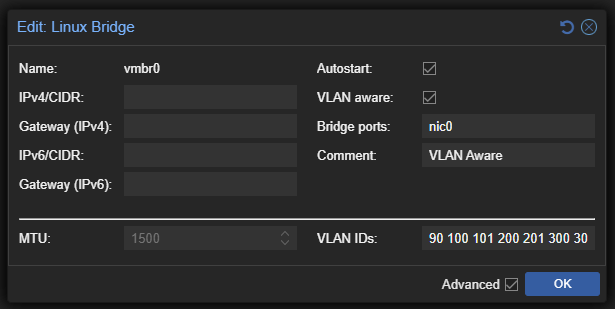
VLAN added to VLAN aware vmbr0 on ALL cluster nodes
Under Node (pmx01/2/3) > System > Network > vmbr0 > Edit
VLAN must be added to VLAN IDs section on bottom right
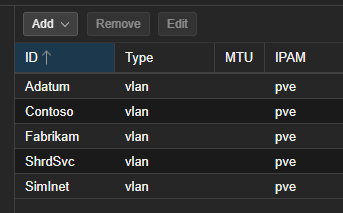
SDN Zone creation for tenant
Under Datacenter > SDN > Zones create a VLAN zone for the tenant
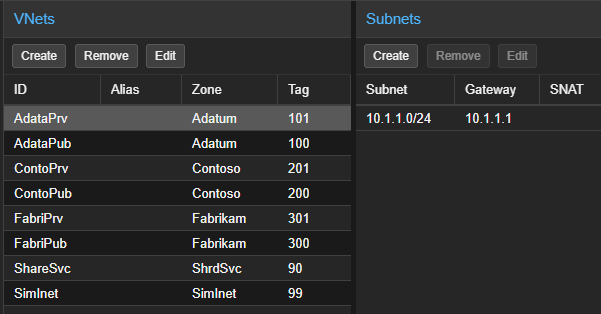
Vnet for Public and Private subnet created in SDN Zone
Under Datacenter > SDN > VNets create a VNet for the tenants public and private subnet and add the respective network in the respective VNet.
Proxmox tenant admin user and tenant group created
Under Datacenter > Permissions > Users create a Admin User for the tenant in the PVE realm. Admin user is created in case there is an issue with their identity provider

Under Datacenter > Permissions > Groups create a group for the tenant. Add the tenant admin user created previously

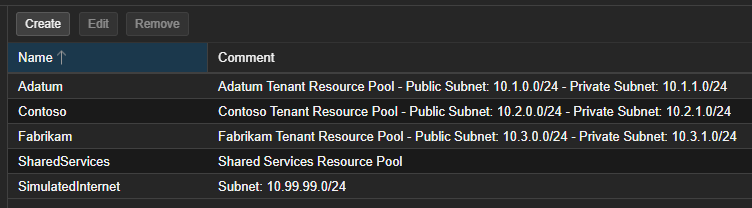
Proxmox Resource Pool Created
Under Datacenter > Permissions > Pools create a resource pool for the tenant
Proxmox RBAC added for Resource Pool and SDN Network
Under Datacenter > Permissions create permissions for the tenants resource pool. the permissions that tenants require are:
/pool/tenant - PVEVMUser
/sdn/zones/tenant - PVESDNUser
Required Virtual Machines and Containers Provisioned
Virtual machines and Containers that are required by the tenant can be created at this point. when the VMs and CTs are being created, the storage must be places in the tenants storage as well as the VM/CT must be placed in the respective tenants resource pool
Tenant identity provider linked with Proxmox realms
Under Datacenter > Permissions > Realms add the tenants Active Directory, LDAP, or OpenID Connect Server to authenticate against the tenants identity provider.
Tenant may chose to host Active Directory in their private subnet or utilize pre existing identity infrastructure and have a DNS server in their private subnet instead
Tenant Account Created on Nginx Proxy Manager
on npm.fmjsystems.com a tenant account needs to be made with permissions set so they are only to see items that are created by their account. this is one of the options that can be set when the account is made.
Required Nginx Proxy Manager Listings Created for Tenant
Once the base environment for the tenant is created, listings for the created services need to be made for example, the web server and the VPN